Jewelry Rendering as a Pre-Production Control Tool: From CAD Approval to Manufacturing Confidence
Photorealistic jewelry rendering is often discussed as a presentation tool. It is associated with product launches, e-commerce imagery, social media campaigns, and client-facing visuals. Those applications are important, but they represent only part of its value.
When rendering is built on accurate 3D jewelry CAD design, it can also become a practical form of pre-production control. High-resolution images and carefully planned jewelry animations allow designers, jewelers, manufacturers, and brand owners to inspect proportions, surface transitions, gemstone layouts, moving parts, and material choices before metal is cast or stones are set.
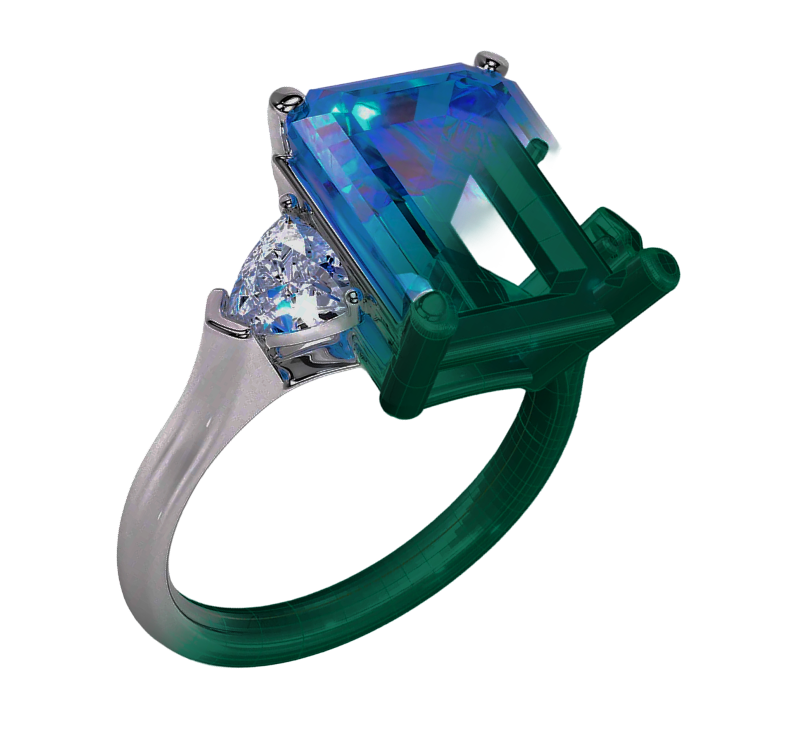
A CAD model may be technically correct yet difficult for a non-specialist to interpret. Wireframes, shaded viewports, and engineering views communicate structure, but they do not fully reveal how polished metal will reflect, how a gemstone will dominate the composition, or whether a design feels visually balanced in motion. Jewelry rendering closes that gap.
The strongest visualization workflow does not beautify an unresolved model. It makes the model easier to evaluate. It turns digital geometry into a realistic preview that can expose weaknesses, support approvals, and reduce avoidable misunderstandings before jewelry manufacturing begins.
Rendering Reveals Problems That Technical CAD Views Can Hide
Professional jewelry CAD modeling is built around dimensions, geometry, stone seats, wall thickness, and manufacturing logic. These technical qualities are essential, but they do not always communicate the final visual character of a piece.
A ring may look balanced in a neutral CAD viewport, yet appear top-heavy once the center stone, polished metal, and realistic reflections are introduced. A pendant may seem proportionate when viewed as gray geometry but feel visually crowded after diamonds and gemstone colors are rendered. An earring may be structurally sound while appearing heavier or longer than expected when presented at realistic scale.
Photorealistic jewelry rendering can reveal issues such as:
- A center stone overpowering the shank
- A halo appearing too dense or too distant from the center stone
- Decorative surfaces losing definition under polished reflections
- Prongs appearing visually heavy despite being technically acceptable
- Mixed-metal sections competing instead of supporting the design
- A pendant bail looking too small for the body of the piece
- Pavé rows appearing uneven from certain viewing angles
- Engraving becoming difficult to read under realistic lighting
- Openwork areas appearing too empty or too crowded
These are not always manufacturing failures. They are often design-resolution issues. Correcting them after casting can require extensive bench work or a complete remake. Correcting them during custom jewelry CAD development is more controlled.
A realistic render therefore adds another form of inspection. Technical views ask whether the piece can be produced. Rendering asks whether the produced piece is likely to look and feel as intended.
Still Images and Video Serve Different Approval Purposes
Photo rendering and video rendering should not be treated as interchangeable formats. Each reveals different qualities of a jewelry design.
A still image allows detailed inspection of one controlled view. It can highlight the front composition, side profile, gallery structure, gemstone arrangement, or surface finish. For engagement ring CAD, several still views may be used to examine the center setting, shank, under-gallery, shoulder transitions, and relationship with a matching wedding band.
A well-composed high-resolution render is particularly effective for checking:
- Symmetry
- Stone alignment
- Prong appearance
- Surface continuity
- Engraving position
- Metal and gemstone contrast
- Proportions between components
- Overall silhouette
Video rendering provides a different level of understanding. As the jewelry rotates, changes angle, or moves through controlled lighting, visual inconsistencies become easier to notice. A design that looks refined from the front may appear bulky from the rear. A pendant may have an attractive face but an unresolved side profile. A bracelet link may appear elegant in isolation but repetitive or awkward when seen moving across the full piece.
Jewelry animation is especially useful for designs involving:
- Hinges and clasps
- Lockets
- Articulated pendants
- Rotating elements
- Modular jewelry
- Reversible designs
- Convertible pieces
- Bracelets and chains
- Complex gallery structures
Motion also communicates scale and volume more naturally than a single image. It helps viewers understand depth, curvature, and the relationship between polished surfaces and gemstones.
For manufacturing discussions, a technical animation may show assembly, opening and closing behavior, component separation, or the path of a moving part. For design approval, a slower cinematic rotation can reveal whether the piece maintains visual quality from every angle.
The most effective workflow uses still images for focused inspection and video for spatial understanding.
Material Accuracy Matters Before Metal Is Chosen
One of the greatest strengths of jewelry rendering is the ability to compare materials before production. However, this advantage depends on visual accuracy.
Yellow gold, rose gold, white gold, platinum, and silver do not simply differ by color. They behave differently under light. Their reflections, warmth, brightness, and contrast with gemstones affect the perception of the entire design.
A highly polished white-metal setting may visually merge with diamonds, creating a continuous field of brilliance. Yellow gold may introduce stronger separation and a warmer frame. Rose gold can soften certain designs but may compete with pink or red gemstones. Matte surfaces reduce sharp reflections and place greater emphasis on form, while polished surfaces can exaggerate curvature and reveal small surface transitions.
Accurate jewelry rendering allows these choices to be evaluated before manufacturing. The purpose is not to display endless color variations. It is to understand how material selection changes the design.
Gemstones require the same discipline. A diamond should not simply appear as a white glowing object. Its apparent brightness depends on cut, angle, environment, lighting, and the surrounding metal. Colored gemstones should show believable hue, saturation, transparency, and depth. An emerald should not look like green glass. A sapphire should not be rendered as an unnaturally luminous blue light source. An opal, turquoise, or cabochon stone requires its own visual behavior.
This becomes especially important in gemstone-first and engagement ring CAD projects. A realistic center stone can alter the apparent balance of the setting. A deep-colored gemstone may make nearby metal feel heavier. A pale stone may require stronger contrast. A halo that looks delicate around a diamond may appear too busy around a saturated sapphire.
Rendering can help resolve these decisions before the manufacturer commits to metal, stones, and labor. But the render must remain honest. If the visualization exaggerates brilliance or hides structural details, it stops functioning as a reliable approval tool.
Rendering Should Reflect Manufacturable Geometry
A common weakness in digital jewelry presentation occurs when the rendered object no longer represents the production model accurately.
Prongs may be digitally reduced to make the stone look larger. Metal edges may be softened beyond what the CAD geometry contains. Surface defects may be hidden. Gemstones may be enlarged slightly for visual impact. Shadows may be arranged to conceal weak transitions. These choices can create an attractive image, but they also create distance between approval and manufacturing.
For professional use, jewelry rendering should be based on the same geometry that will move toward production. If presentation adjustments are made, they should not change the essential structure of the piece.
This is particularly important when a render is used for client approval. A client may approve a delicate-looking ring because the visualized prongs are extremely fine, only to receive a finished piece with stronger and more visible prongs required for stone security. The final jewelry may be correctly manufactured, yet the client still feels that it differs from the approved design.
The same risk exists with pendant CAD modeling. A render may show a slim, lightweight pendant while the production model contains a deeper back structure, thicker lettering, or stronger connections. If those technical elements are hidden from the approval images, the visual expectation becomes inaccurate.
A reliable visualization workflow should therefore include appropriate angles. A front hero image may communicate beauty, while side and rear views communicate construction. For a complex piece, an additional technical render can show thickness, gallery depth, bail size, or assembly.
Rendering should not replace technical communication. It should make technical truth easier to understand.
Video Rendering Can Improve Manufacturing Communication
International jewelry production often involves teams working in different locations. A brand may develop a design with one studio, print the model through another provider, cast it in a separate workshop, and complete stone setting elsewhere. In such workflows, communication becomes part of quality control.
Production-ready 3DM and STL files carry the geometry, but they do not always communicate the intended visual priorities. A short technical animation can clarify how components relate, which side is intended as the primary view, how a clasp should move, or how separate parts should assemble.
For example, a multi-part pendant may include a front plate, back plate, bail, and suspended element. The CAD files contain the pieces, but an assembly animation can show their correct order and orientation. A reversible pendant may require clarity about both presentation sides. An articulated bracelet may need a visual demonstration of link movement and clasp direction.
Video is also valuable for identifying collisions and restricted movement. When an articulated model is animated before manufacturing, the designer can inspect whether components intersect, whether a hinge opens sufficiently, or whether a suspended element rotates beyond its intended range.
This does not replace physical prototyping. Digital animation cannot perfectly reproduce friction, metal flexibility, clasp tension, or wear. It does, however, provide an early layer of validation and communication that static files cannot offer.
In complex digital jewelry manufacturing, the value of animation is not limited to cinematic presentation. It can document design intent.
Establishing a More Reliable Approval Process
A professional approval process should separate emotional approval from technical approval.
Emotional approval concerns the design’s overall appeal. Does the piece feel elegant, bold, refined, contemporary, or consistent with the brand? Photorealistic jewelry rendering is highly effective at supporting this decision.
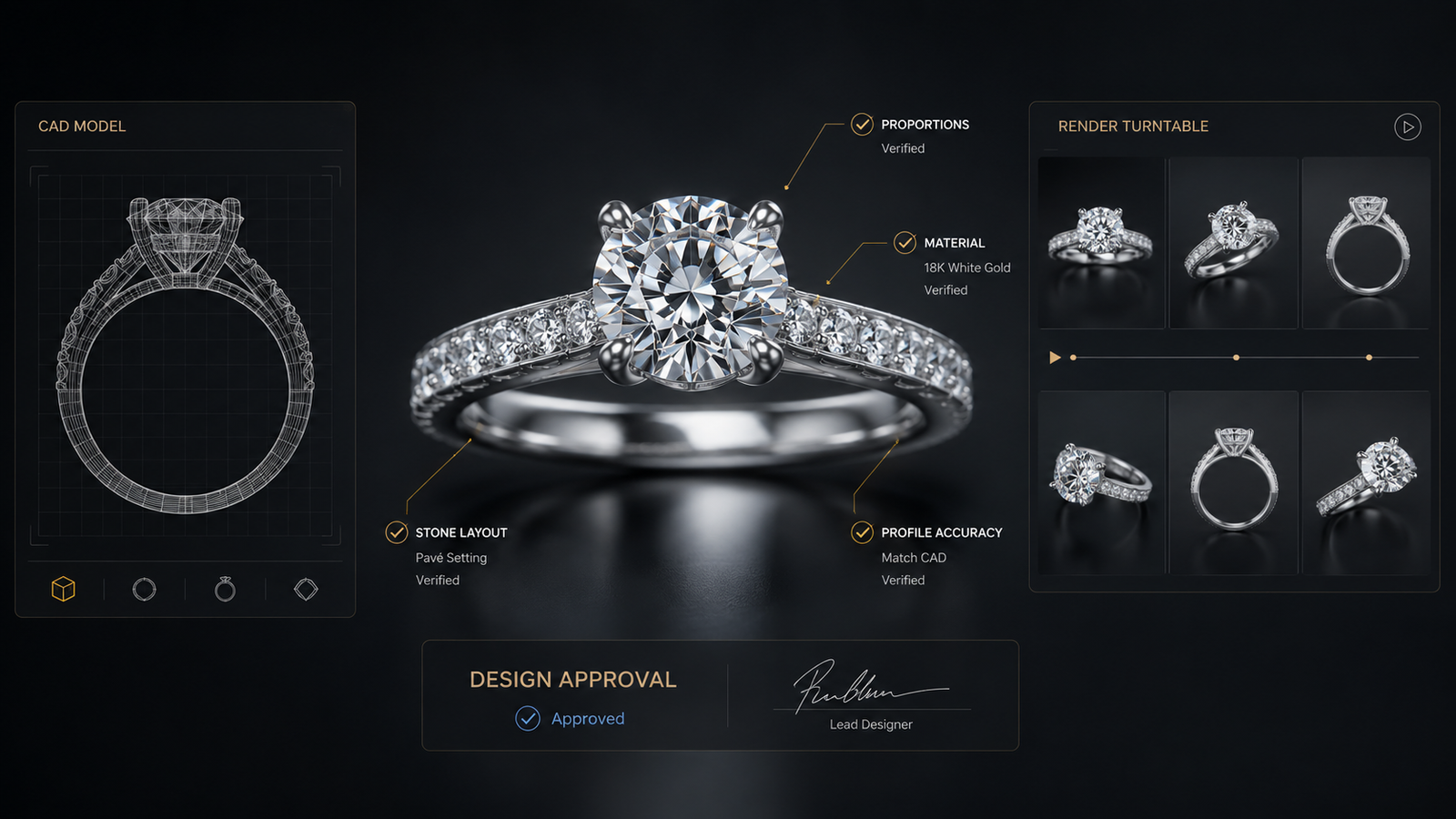
Technical approval concerns structure. Are the dimensions correct? Are the stones accurate? Is the gallery acceptable? Is the shank thickness confirmed? Is the bail appropriate for the chain? Are the moving components understood? These decisions may require CAD screenshots, measurements, section views, or technical documentation in addition to rendered images.
When the two are combined carelessly, misunderstandings can occur. A client may approve the beauty of an image without realizing that certain dimensions are still unresolved. A manufacturer may receive technically correct files without understanding which visual details are most important to preserve.
A stronger workflow may include:
- Approval of overall concept and proportions
- Confirmation of stone dimensions and metal choice
- Review of technical CAD views
- Review of photorealistic still images
- Review of animation where movement or complex volume is involved
- Final confirmation of the production geometry
This structure gives each visual format a defined purpose.
Jewelry rendering is most useful when it supports decisions rather than simply creating excitement. Its role is to make the design more understandable, reduce ambiguity, and protect the relationship between the digital model and the manufactured piece.
Conclusion: Visualization Is Part of Technical Quality
The boundary between jewelry design, visualization, and manufacturing has become increasingly connected. A CAD file defines the object. Rendering communicates how that object may appear. Manufacturing tests whether the digital decisions hold up in metal, gemstones, movement, and wear.
Professional photo and video jewelry rendering can strengthen this process when it remains faithful to the underlying 3D jewelry CAD design. Still images reveal proportion, material interaction, stone layout, and surface quality. Video reveals depth, movement, changing reflections, and visual consistency from multiple angles.
The value of rendering is not measured only by how luxurious the image looks. It is measured by how clearly the image communicates the design.
For CADVANCE, high-end jewelry visualization is closely tied to accuracy. A successful render should help jewelers, manufacturers, brand owners, and designers make better decisions before production. It should reveal the piece rather than disguise it, support the CAD rather than contradict it, and create confidence without creating unrealistic expectations.
When visualization is treated as part of pre-production quality control, it becomes more than presentation. It becomes a practical bridge between digital design and finished jewelry.